
Employee communications platforms are on every company’s must-have workplace tech stack list. Since proper workplace communications play a critical role in driving employee engagement, boosting employee productivity, and enabling better team collaboration, many organizations are now investing more resources into employee communications software.
In practice, this means moving away from scattered emails, siloed chat tools, and disconnected updates toward a centralized employee communication platform that gives everyone access to the same information. When employees can easily find company news, leadership messages, policies, and team updates in one place, alignment improves and misunderstandings decrease. The result is faster decision-making and fewer productivity bottlenecks.
Furthermore, the emergence of remote and hybrid work has significantly increased the demand for such solutions. Working in socially distanced working environments has its downsides, and communications technology can go a long way in eliminating the biggest communication barriers in the workplace.
Time zone differences, limited face-to-face interaction, and information overload require more intentional communication structures. A modern employee communication platform helps standardize messaging, personalize content for different audiences, and create feedback loops that ensure communication is two-way — not just top-down.
Before we dig deeper into the list of the top employee communications platforms on the market, it’s important to understand various types of solutions that enhance workplace communications. From social employee intranets to project management and video conferencing solutions, the internal communications tech market is huge. So choosing the right technology is an important imperative.
Let’s now dig deeper into the best employee communications platform on the market.
1. Haiilo

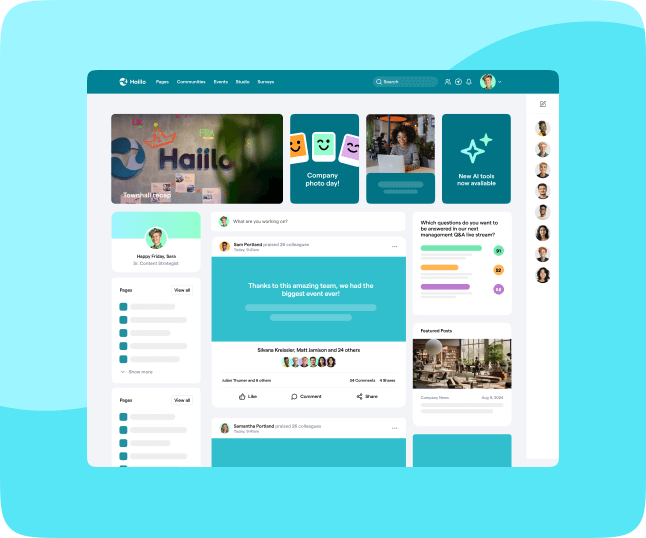
Haiilo is one of the leading employee communications and employee experience platforms on the market. It is built to empower employers to align their entire workforce, improve employee engagement and knowledge management, and increase workplace productivity. As a comprehensive employee communication platform, Haiilo goes beyond basic messaging by centralizing internal communications, culture initiatives, and collaboration in one structured environment.
Haiilo’s powerful social intranet is a digital hub employees use to start their day. Interactive news feeds keep everyone informed and engaged on a daily basis. The solution enables internal communicators to deliver hyper-personalized content to every employee, at the right time, via the right channel. This ensures frontline workers, desk employees, and managers all receive relevant updates without being overwhelmed by unnecessary information. Native integrations with other workplace technologies make multichannel communications a breeze. It also integrates with Google Workspace and Office 365, making the platform a natural extension of employees’ existing workflows rather than another disconnected tool.
An intuitive content builder with robust approval workflows makes content creation seamless, structured, and collaborative. Built-in AI assistance helps communicators build engaging content 10x faster while maintaining brand consistency and governance standards.
Furthermore, Haiilo comes with a beautifully designed mobile app, ideal for organizations with frontline or deskless workers who rely on real-time access to company information.
Best for (and not so best for)
If you are looking for an intuitive, modern, and comprehensive employee communication platform to streamline company-wide communications efforts, Haiilo is the way to go. Compared to similar solutions on the market, Haiilo is very easy to implement and manage, even for lean internal communications teams. Excellent support and flexible product roadmaps make it a strong long-term partner rather than just a software vendor.
The great thing about Haiilo is that it combines communications with employee listening and advocacy capabilities. Organizations can measure sentiment, gather feedback, and activate employees as brand ambassadors — all within the same ecosystem.
If you are, however, looking for a solution to solely improve synchronous communications in the workplace, Slack or Microsoft Teams may be a better option for you.
Key features and functionalities
Organizations choose Haiilo because of its rich list of powerful features that support both strategic and day-to-day communication needs:
- Multichannel communications to reach every employee on any channel
- Colleagues list and user profiles to strengthen internal networks
- Direct and group channels for structured team collaboration
- Document and content management with clear governance
- Departmental knowledge hubs for improved knowledge sharing
- Intuitive content builder with rich media support
- Branded mobile app for all devices
- Employee advocacy features to amplify company messaging
- Employee surveys, engagement insights, and actionable recommendations for improvement
Get started with Haiilo employee communications platform!
2. Slack

Slack is one of the most popular workplace technologies in general. Synchronous communications in the workplace are critical for driving better workplace collaboration and connecting employees on a daily basis. Whether teams are remote, hybrid, or office-based, the ability to ask quick questions, resolve issues in real time, and collaborate instantly has become a baseline expectation in modern workplaces.
In 2014, the year of its launch, Slack was already listed as a Unicorn startup. Slack continues to be widely adopted as a real-time collaboration tool and remains one of the foundational solutions many companies use alongside purpose-built employee communication platforms to drive synchronous workplace communication.
According to recent product usage reports from Salesforce, Slack now supports over 40 million weekly active users, reflecting sustained adoption across distributed teams and hybrid workplaces.
Best for (and not so best for)
As an instant messaging platform, Slack is one of the best solutions for enabling synchronous communication in the workplace. Powerful integrations with many other workplace tools make Slack an excellent employee productivity tool, especially for project-based teams that rely on speed and flexibility.
However, while Slack excels at real-time messaging, it lacks some of the structured communication capabilities required for a comprehensive efficient employee communications strategy. It is not designed to serve as a centralized employee communication platform for company-wide announcements, knowledge management, or long-term content governance. As message volume grows, important updates can easily get buried in fast-moving channels.
Key features and functionalities
Slack buyers usually look for functionalities such as:
- Real-time 1-on-1 and group messaging
- Integrated voice and video calling
- Screen sharing and file sharing
- Powerful integrations with third-party tools
- Push notifications
- Mobile app for on-the-go collaboration
3. ClickUp

Even though an employee communication platform is not ClickUp’s primary software category, it does enable better workplace collaboration. ClickUp is a project management software that streamlines project planning, task allocation, and team organization, offering real-time status updates for quick decision-making and project control. It also helps managers understand how much time their teams spend working on various projects to improve efficiency at an organizational level. By centralizing tasks, deadlines, and ownership, ClickUp reduces confusion around responsibilities and project progress.
The great thing about ClickUp is that it comes with powerful built-in features such as chat and whiteboards, allowing teams to brainstorm, comment on tasks, and collaborate without switching tools. It can be easily customized to manage virtually any type of project, with no code or add-ons required, and it includes useful pre-made project templates that accelerate onboarding and execution.
Best for (and not so best for)
ClickUp excels at integrating various employee productivity tools into a single platform. That makes it one of the most popular project management solutions on the market, particularly for teams that need high visibility into workflows, milestones, and deliverables.
If you are a large company with a complex organizational structure and struggling to bring more visibility into your employees’ ongoing work and projects, ClickUp is a strong fit. It provides transparency across teams and departments, helping leaders track execution and resource allocation more effectively.
If your main goal, however, is to improve and streamline the overall workplace communications across the entire organization, ClickUp may not be enough. While it supports collaboration within projects, it is not designed to function as a centralized employee communication platform for company-wide announcements, culture initiatives, or structured internal campaigns.
Key features and functionalities
Some of the most important ClickUp features include:
- @mentions for direct task collaboration
- Activity dashboard, news feed, and tracking
- Support for agile methodologies
- Alerts and escalation management
- Budgeting and forecasting tools
- Calendar management, automated scheduling, online time clock, and leave management
- Real-time reporting and analytics
4. ProofHub

ProofHub is an all-in-one solution for project management and team collaboration. It eliminates the need to use multiple platforms for collaboration by centralizing communication around projects, tasks, and deliverables. Instead of switching between email threads, chat apps, and task boards, teams can manage discussions, files, and timelines in one structured workspace.
With its intuitive interface, you can effortlessly collaborate with team members, share files, and exchange ideas in real time. ProofHub allows you to manage multiple tasks, assign employees to projects, maintain a bird’s-eye view of progress, and ensure communication stays connected to specific deliverables. This context-driven communication reduces misunderstandings and keeps conversations focused on outcomes rather than scattered messages.
Best for (and not so best for)
ProofHub is particularly strong for managing multiple projects of varying complexity and size, accommodating growing teams without increasing pricing complexity. It fosters collaboration and centralizes task-related communication in one place. Its flat fixed-fee pricing model — with no per-user costs — makes it attractive for organizations that want predictable expenses as they scale.
At the same time, ProofHub’s primary focus remains project execution. If you are looking for a comprehensive employee communication platform to improve company-wide alignment, strengthen culture, or distribute strategic internal communications, its feature set may feel limited. While it includes organization-wide announcements, it is not designed to serve as a central digital hub for broader employee engagement initiatives.
Key features and functionalities
Some of the core features and functionalities of ProofHub include:
- Built-in chat, @mentions, shared notes, and discussions
- Online proofing for creative and content reviews
- Centralized file repository
- Timer and timesheets for tracking effort
- Comprehensive task management
- Custom reports for performance insights
- Custom roles and access permissions
- Organization-wide announcements
5. Beekeeper

Beekeeper is a workplace communications app specially designed for frontline employees. As a mobile-first employee communication platform, it focuses on connecting deskless workers who typically don’t have regular access to email or desktop systems. With it, you can extend existing HRIS systems so team members can access shifts, pay slips, and training — all from one app on their mobile phones.
With the communications module, you can use chats, streams, surveys, polls, and campaigns to close the loop with your frontline. This makes it easier to distribute operational updates quickly, collect feedback from field teams, and ensure that critical announcements reach everyone in real time.
Furthermore, the platform aims to replace paper and manual processes with modern ways to get work done. Users and admins can digitize daily tasks, checklists, and forms to prevent mistakes and save teams time. By standardizing processes digitally, companies can reduce compliance risks and improve operational consistency across locations.
Best for (and not so best for)
Beekeeper is mainly used by organizations in retail, hospitality, and construction industries where employees are mobile and often work across multiple sites. It combines communication and operational tools in one place, potentially replacing additional workplace tech and reducing system complexity for frontline environments.
However, one of the biggest downsides reported by users is its unintuitive interface and limited user-friendliness. For organizations with a diverse workforce and varying levels of digital literacy, usability can directly impact adoption rates.
Given the fact that frontline workers may need to be more tech-savvy, make sure that you evaluate the ease of use before investing in this solution. A successful employee communication platform for frontline teams must be simple, fast, and accessible from day one.
Key features and functionalities
These features make Beekeeper one of the popular employee communication and productivity tools for frontline workers:
- Employee training, onboarding, and offboarding
- Pay summaries
- Shift changes and PTO requests
- Pulse surveys
- Group messaging and crisis communications
- SOD / EOD checklists
- Preventative maintenance
- Health and safety checks

Google Workspace is one of the most critical workplace solutions for organizations across the world. Even though it doesn’t necessarily fall under the employee communications software category, it certainly does improve workplace communication and collaboration activities. For many companies, it serves as the operational backbone for daily work — from drafting documents to hosting meetings and managing files.
Google Workspace brings email, chat, files, meetings, and your favorite apps into a people-first experience powered by Google AI so that you can safely connect, create, and collaborate. Its strength lies in real-time collaboration: multiple employees can edit documents simultaneously, leave comments, and resolve feedback without endless email threads. This significantly speeds up workflows and reduces version control issues.
Best for (and not so best for)
If you are primarily looking for an email and document management solution for your company, Google Workspace is probably the best solution to go with. It is reliable, widely adopted, and easy to scale as your organization grows.
However, while Google Workspace enables collaboration within teams, it is not designed to function as a centralized employee communication platform for structured, company-wide messaging. Google Chat has never achieved the same level of adoption as other messaging tools, and heavy reliance on Gmail can contribute to email overload — one of the biggest internal communication challenges organizations face today.
Hence, if your goal is to improve your organization’s internal communications strategy and boost employee experience through targeted updates, engagement features, and measurable communication impact, Google Workspace alone may not be enough.
Key features and functionalities
Google Workspace includes productivity and collaboration tools such as:
- Gmail for custom business email
- Drive for secure cloud storage
- Docs for real-time word processing and collaboration
- Meet for video and voice conferencing
- Chat for team messaging
- Slides for presentation building
- Shared Calendars for scheduling and coordination
7. Chanty

Chanty is another comprehensive cloud-based collaboration platform that combines employee communication, project management, and automation to connect teams and help them work together more effectively. It is designed for small to mid-sized teams that want to centralize conversations and tasks without investing in multiple separate tools.
Chanty helps teams improve collaboration, productivity, and overall business communication. Unlimited message history, built-in task management, file sharing, and powerful notifications help teams stay organized and avoid losing important updates in long chat threads. Its simplicity and clean interface make it relatively easy to onboard new users and get started quickly.
It integrates messaging with a variety of apps such as Google Drive, Dropbox, Trello, GitHub, Zapier, Jira, Asana, and others. These integrations allow teams to connect existing workflows and reduce friction between tools.
Best for (and not so best for)
Chanty is a strong option for organizations looking for communication and lightweight project management capabilities in a single platform. It works particularly well for teams that prioritize real-time collaboration and structured task execution.
Its features and functionalities mostly focus on improving instant messaging and enabling better task management. However, it is not positioned as a comprehensive employee communication platform for company-wide messaging, strategic internal campaigns, or engagement measurement.
Unlike more robust internal communications solutions, Chanty does not heavily emphasize features such as engaging news feeds, company newsletters, employee surveys, or advanced engagement analytics.
Key features and functionalities
- 1-on-1 and group messaging
- Audio/video calls and screen sharing
- File sharing
- Create, assign, set deadlines, and discuss tasks
- Track team workflow using a Kanban board
- Embedded media viewing (YouTube videos, GIFs, social content)
8. Pumble

Compared to other solutions on the list, Pumble is a relatively young company. It is an instant messaging platform built to enable teams to collaborate more easily. With the platform, you can send messages and files to team members, organize conversations into channels, quickly retrieve past discussions, and start video conferences with a single click. Its clean interface and straightforward setup make it easy for teams to adopt without extensive onboarding.
According to the company’s website, 154,831 teams communicate via Pumble today, highlighting its growing popularity among small and mid-sized businesses looking for cost-effective collaboration tools.
Pumble is an online web app that works directly in a browser, but you can also install it on your desktop or mobile phone for added convenience. This flexibility ensures that teams can stay connected whether they are working remotely, in the office, or on the go.
Best for (and not so best for)
Pumble is a great solution for small organizations and teams looking for a free alternative to solutions such as Slack and Microsoft Teams. It provides the core features needed for real-time communication, including 1-on-1 messaging, channels, and video calls, without complex pricing structures.
If data privacy is a concern, Pumble encrypts data at rest and in transit and holds certifications such as ISO 27001 and SOC 2, which can reassure organizations operating in regulated environments.
However, while Pumble performs well as a messaging tool, it is not designed to function as a comprehensive employee communication platform for structured internal communications, company-wide campaigns, or engagement measurement. Organizations seeking advanced content management, targeted messaging, or analytics may require a more robust solution.
Key features and functionalities
Core features and functionalities include:
- Direct messages, channels, and threaded conversations
- Voice calls, video conferencing, and screen sharing
- Guest access
- Customizable notifications
- File sharing
- Unlimited message history
- Powerful search and file browser

Microsoft Teams is a chat-based workspace within Office 365. It brings together everything employees need to collaborate more efficiently, including people, conversations, content, and other workplace tools. By combining messaging, meetings, and document collaboration into one interface, Teams reduces the need to switch between applications during daily work.
MS Teams is the go-to instant messaging platform for those companies that already use Office 365. Its native integration with Outlook, SharePoint, OneDrive, and other Microsoft tools makes it a natural extension of the Microsoft ecosystem. For organizations heavily invested in Microsoft 365, Teams often becomes the central hub for real-time collaboration.
Best for (and not so best for)
Similarly to Slack, Microsoft Teams was designed to improve synchronous, real-time conversations at work. It performs particularly well for quick discussions, internal meetings, and collaborative document editing within project teams.
However, while Teams is strong in live messaging and meetings, it does lack some of the structured capabilities required for asynchronous communication and a more strategic employee communications approach. It is not built to function as a comprehensive employee communication platform for company-wide campaigns, targeted internal news distribution, or engagement analytics. As message volume increases, important updates can easily get lost in busy channels.
Key features and functionalities
Here’s the list of main Microsoft Teams capabilities:
- Integration with all Microsoft 365 products
- Document sharing, editing, and collaboration within the Teams environment
- Video conferencing capabilities
- Chat and messaging
- Channels for structured team discussions
- Multi-factor authentication (MFA) support
- Mobile accessibility
10. Zoom

Zoom brings together team chat, phone, whiteboard, and meetings in one offering. Originally known for its video conferencing capabilities, Zoom has evolved into a broader communications suite designed to support hybrid and remote work environments. The platform provides an intuitive user experience, simplifies IT management, and delivers the flexibility modern teams expect when collaborating across locations.
The company does a great job leveraging AI to enhance usability and productivity. Zoom AI Companion acts as a built-in digital assistant that can summarize meetings, draft follow-up messages, and surface key discussion points — all at no additional cost. These features help reduce manual note-taking and ensure that important insights don’t get lost after meetings end.
Best for (and not so best for)
If you are looking for a communications platform to improve your company’s online meetings and video calls, Zoom is a strong choice. Its reliability, ease of use, and global adoption make it a trusted solution for virtual collaboration.
However, while Zoom excels at real-time meetings and calls, it is not designed to function as a comprehensive employee communication platform. It lacks structured content distribution, advanced targeting, engagement analytics, and company-wide communication management features that are essential for a strategic internal communications approach.
Key features and functionalities
With Zoom you get:
- Online video meetings
- Team Chat
- Cloud VoIP phone services
- Whiteboard collaboration
- Appointment scheduler
- Email and calendar integration
11. LumApps

LumApps is a cloud-based employee communications platform founded in 2015. It was built to unify the modern workforce through improved communication, engagement, and knowledge management. As an employee communication platform, LumApps focuses on creating a centralized digital hub where employees can access company news, resources, and collaboration tools in one place.
The app offers native integration with Google Workspace and Microsoft 365, which reduces app switching and minimizes information silos in the workplace. By embedding communication directly into the tools employees already use, LumApps aims to increase adoption and ensure important updates are not overlooked. The product also personalizes experiences based on roles, locations, or departments, tailoring content for executives, managers, and frontline workers alike.
Best for (and not so best for)
LumApps is suited for organizations looking for a structured solution to improve employee communications and strengthen organizational alignment. Features such as news feeds, digital signage, and newsletters allow internal communicators to distribute important company information consistently across the organization.
LumApps also comes with pre-built SDKs, making it easier for companies with technical resources to build custom integrations and extend functionality according to their needs.
However, according to some customer reviews, LumApps can be complex to roll out, particularly for organizations without dedicated IT support. Additionally, some users report that customer support responsiveness and the speed of feature development could be improved.
Key features and functionalities
Some of the core features and functionalities of this employee communication platform include:
- Chat and messaging
- Personalized news feeds
- Newsletter creation and distribution
- Employee-generated content
- Mobile app access
- Onboarding support
- Reporting and analytics
- Automated workflows
Why Every Company Needs an Employee Comms Platform
Besides the fact that proper employee communications improve employee engagement, motivation, and organizational alignment, the reasons why every company should invest in a dedicated employee communication platform go much deeper.
Even though there are many workplace technologies available today, most of them were not built to support structured internal communications. Chat tools focus on speed, project management tools focus on execution, and email was designed for one-to-one correspondence — not for strategic, organization-wide messaging. As a result, many companies still struggle with fragmented communication, inconsistent messaging, and limited visibility into whether their communications are actually being read or understood.
Furthermore, many organizations continue to rely heavily on email as their primary means of communication. While email may feel convenient, it often contributes to information overload. Important updates get buried in crowded inboxes, targeting is limited, and tracking engagement is nearly impossible beyond open rates.
As nicely explained by Lighthouse Research and Advisory:
…email’s value proposition for corporate communications is inferior when it comes to relevance (right message), targeting (right audience), reach (right time/place), and analytics. Email simply can’t match purpose-built technologies for getting the right information to the right people at the right time
A modern employee communication platform addresses these gaps directly. It enables targeted messaging, multichannel distribution (desktop, mobile, digital signage), measurable engagement insights, and structured content governance. Instead of broadcasting the same message to everyone, companies can personalize communications based on role, location, or department — ensuring relevance while reducing noise.
In short, if internal communication is treated as a strategic driver of performance rather than an operational afterthought, a purpose-built platform becomes a business necessity — not a nice-to-have.

One of the biggest values of advanced solutions is their analytics and measurement capabilities. Historically, one of the biggest challenges for internal communications and HR departments was measuring the impact of their internal communications campaigns, internal newsletters, internal podcasts, and other initiatives.
However, some internal communications platforms include measurement tools to support the analysis of messaging performance. For instance:
- Do you even know if your company’s last communication was read?
- If so, what percent of the employee population read it?
- What percentage took action on the information?
What separates Haiilo from many other solutions on the market is the function of employee listening. Internal communicators can simply attach a simple survey to every campaign asking employees for feedback!
Types of Employee Communications Platforms
Many different workplace technologies enable and enhance internal communications and team collaboration.
These are some of the most common software categories that fall within this broader category and are heavily adopted by digital-first workplaces providing outstanding digital employee experience.
Social employee intranets
Social intranets (for example, Haiilo or Workplace) are solutions built to serve as a digital home for every employee. Ideally, they are able to connect people, information, documents, and tools under a single platform.
💡 Related: 11 Best Intranet Platforms for Enterprise In 2023
Instant messaging platforms
Instant messaging platforms are best for real-time workplace communications. Some of the most popular solutions include Slack and Microsoft Teams.
Project management tools
Project management tools are best for enabling better inter and intra-departmental collaboration on various projects.
Video conferencing platforms
Video conferencing tools are employee communications platforms for real-time video meetings and conferencing.
Document management solutions
Document management software is a solution that streamlines collaboration on various documents, presentations, whitepapers, and other materials.
How to Choose the Best Employee Communications Platform
In the sea of various solutions that improve workplace collaboration and communication, it can be hard to choose the best option for your organization.
Before making a decision, it is critical that you build a solid business case based on your organization’s needs and desired outcomes.
When building a business case, remember that workplace communications have a direct impact on employee engagement, productivity, and retention.
Next, make sure that you evaluate features and functionalities, security characteristics, ease of use and implementation, and integration capabilities.
To help you get started, check out our newest guide for measuring intranet ROI!
Frequently Asked Questions
1. What is an employee communication platform?
An employee communication platform is a centralized solution designed to streamline how organizations share information with their workforce. Unlike chat tools or email, it enables structured, targeted, and measurable internal communications. A modern employee communication platform typically includes news feeds, content management, multichannel distribution (desktop and mobile), analytics, and integrations with existing workplace tools.
2. How is an employee communication platform different from Slack or Microsoft Teams?
Slack and Microsoft Teams are primarily built for real-time, team-level collaboration. An employee communication platform focuses on company-wide communication — leadership updates, internal campaigns, change management, and engagement initiatives. While chat tools are great for quick conversations, they often lack content governance, audience targeting, and engagement analytics needed for a strategic internal communications approach.
3. What features should you look for in an employee communication platform?
Look for personalized news feeds, powerful search, mobile access for frontline workers, content approval workflows, analytics, and integrations with systems like Microsoft 365 or Google Workspace. Targeted messaging capabilities are especially important to ensure employees receive relevant updates without being overwhelmed. Ease of use and adoption should also be key evaluation criteria.
4. How do you measure the success of an employee communication platform?
Success goes beyond login numbers. Track metrics such as content engagement, comments, shares, survey participation, and reach across different employee groups. Over time, you should also see improvements in alignment, faster information flow, and reduced email dependency. A well-implemented employee communication platform makes communication more transparent, measurable, and impactful.