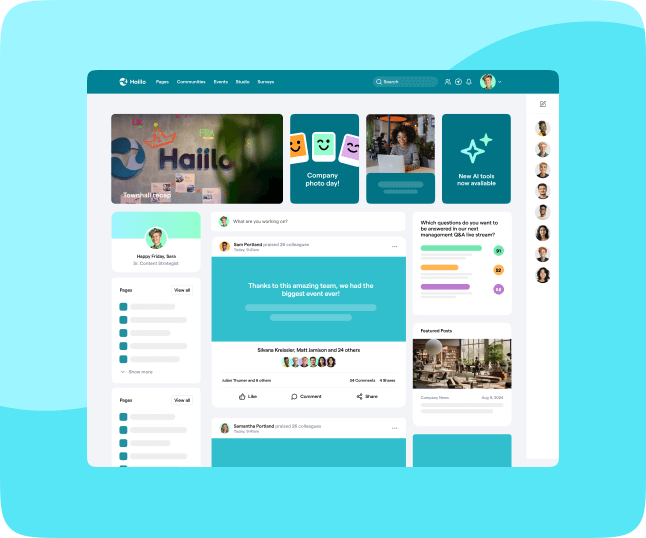

The way employees work has changed—again. Hybrid setups, distributed teams, and a flood of digital tools have reshaped how work actually happens day to day. And in 2026, one thing is clear: employee apps aren’t just nice to have—they’re essential infrastructure.
Today’s workforce is mobile, distracted, and overwhelmed with communication. Employees spend up to 88% of their workweek communicating across tools like email, chat, and meetings. At the same time, poor communication remains one of the biggest blockers to productivity and engagement, with 86% of workers saying it’s the main cause of workplace problems.
That’s where employee apps come in.
Modern employee apps bring communication, collaboration, and information into one place—on the device employees already use most: their phone. Instead of chasing updates across emails, intranets, and chats, employees get what they need, when they need it, in a way that actually fits how they work.
In this guide, we’ll break down what employee apps really are in 2026—and why more organizations are making them the backbone of their workplace experience.

What are employee apps?
Employee apps are mobile-first platforms designed to connect employees with the information, tools, and people they need to do their jobs effectively.
At their core, employee apps combine:
- Internal communication (news, updates, announcements)
- Collaboration tools (messaging, commenting, sharing)
- Knowledge access (documents, policies, resources)
- Engagement features (feedback, surveys, recognition)
But in 2026, the definition has evolved.
Modern employee apps are no longer just “communication tools.” They are central hubs for the employee experience, integrating with tools like Microsoft Teams, Slack, SharePoint, and HR systems to create a seamless digital workplace.
And adoption is already widespread: 80% of enterprise employees now use mobile apps for work-related tasks.
The expectation is simple: If employees can manage their entire lives from their phone, they expect the same from work.
💡Read: The 2026 guide to building good workplace culture
The importance of using employee apps in the workplace
Work is no longer tied to a desk—or even a single location.
By 2025, 45% of the global workforce was fully mobile, and 65% use mobile devices for work. At the same time, deskless workers—those in retail, healthcare, manufacturing, and logistics—make up over 80% of the global workforce. [worldmetrics.org] [prnewswire.com]
And yet, many of these employees are still disconnected from company communication.
- 54% of deskless workers have limited access to email
- Only 10% are very satisfied with internal communication
- One in four employees doesn’t know where to find critical information
At the same time, engagement is dropping globally. Only around 21% of employees are actively engaged at work—a huge risk for productivity, retention, and performance.
The takeaway is pretty clear:
The old ways of communicating—email blasts, static intranets, one-size-fits-all messaging—no longer work.
Employee apps solve this by bringing communication into a mobile-first, personalized, real-time experience that actually reaches employees where they are.

12 reasons to implement an employee app at your company
1. One central source of truth
Modern workplaces are overloaded with tools. Employees jump between email, chat apps, intranets, and documents just to find basic information.
Employee apps cut through the noise by centralizing everything in one place.
This matters more than ever: 84% of business leaders say they’re communicating through more channels than ever before. More tools doesn’t mean better communication—it often means more confusion.
Employee apps simplify the experience by giving employees a single destination for everything work-related.
2. Communication that’s actually relevant
Mass email blasts don’t work anymore.
Employees expect personalized, relevant content—just like they get from the apps they use in their personal lives. And when communication isn’t relevant, they simply ignore it.
In fact, 70% of workers say wasted time is the biggest consequence of poor communication.
Employee apps solve this with:
- Audience segmentation
- Role-based targeting
- Location-based updates
So employees only see what actually matters to them.
3. Better reach for deskless and distributed workers
For deskless workers, traditional communication channels often fail completely.
Employee apps are mobile-first by design, making it easy to:
- Send real-time push notifications
- Deliver updates instantly
- Reach employees without corporate email
And since 80% of employees use mobile apps for work already, adoption is far easier than rolling out yet another desktop tool.
4. Faster attention and response
Email is slow—and easy to ignore.
Employee apps use push notifications and real-time alerts, helping organizations cut through the noise and get immediate attention when it matters most (think: crisis comms, urgent updates, safety alerts).
Given that employees spend around 20 hours per week using communication tools, speed and clarity make a huge difference.
5. Improved engagement and retention
Employee engagement isn’t just an HR metric—it’s a business issue.
Highly engaged teams deliver:
- 23% higher profitability
- 59% lower turnover
Employee apps support this by:
- Making employees feel informed and included
- Giving them a voice through feedback tools
- Creating a more connected workplace culture

6. Seamless collaboration across teams
Work happens everywhere now—across locations, time zones, and devices.
Employee apps make collaboration easier by offering:
- Messaging and commenting
- Content sharing
- Integration with tools employees already use
And it matters: 79% of employers rely on digital tools to enable collaboration.
7. Better employee experience (less friction)
Employees don’t want to hunt for information.
Employee apps create a consumer-grade experience at work, where:
- Information is easy to find
- Content is easy to consume
- Actions are quick to complete
That reduces frustration, stress, and wasted time—especially in complex, tool-heavy environments.
8. Two-way communication and feedback
Employee apps turn communication into a conversation.
Instead of top-down messaging, employees can:
- React, comment, and share
- Respond to surveys
- Provide real-time feedback
This is critical when you consider that 75% of employees say trust improves when feedback is listened to and acted on.
9. Stronger alignment and clarity
Miscommunication is expensive.
Employees lose 35+ working days per year due to ineffective communication, and many feel unclear about priorities and goals. [axioshq.com]
Employee apps help organizations:
- Clarify strategy and messaging
- Reinforce priorities consistently
- Keep everyone aligned
10. Easier change and crisis management
In times of change, communication needs to be:
- Fast
- Clear
- Consistent
Employee apps make it easier to:
- Reach every employee instantly
- Deliver updates in real time
- Ensure messages are seen and understood

11. Built-in employee advocacy
Many employee apps now include advocacy features, allowing employees to:
- Share company content externally
- Amplify brand messaging
- Build trust with their networks
This turns employees into active brand ambassadors—without adding friction.
12. Real data and insights
Unlike email or traditional intranets, employee apps provide real analytics.
You can track:
- Engagement rates
- Content performance
- Employee activity
This helps communicators move from guessing to making data-driven decisions.
The future of employee apps
Employee apps are quickly becoming the default interface for work.
As organizations continue to adopt hybrid models (with 79% of remote-capable employees working remotely at least part of the time), the need for a centralized, mobile-first experience will only grow.
Looking ahead, employee apps will evolve with:
- AI-powered personalization
- Smarter search and recommendations
- Deeper integrations across the digital workplace
- More focus on employee experience (not just communication)
The direction is clear: Work is moving to mobile, and employee apps are leading the way.

Choosing the best employee app for your organization
Not all employee apps are created equal.
At a minimum, look for:
- A seamless mobile experience
- Personalized communication and targeting
- Fast access to information and documents
- Push notifications for critical updates
- User-generated content and social features
- Access for deskless employees
- Integrations with your existing tools
- Strong analytics and reporting
The right employee app doesn’t just improve communication—it transforms how work happens across your entire organization.
FAQ: employee apps
What is an employee app?
An employee app is a mobile-first platform that gives employees access to company communication, tools, and information in one place. It replaces fragmented systems—like email, intranets, and chat tools—with a single, streamlined experience designed for how people actually work today.
How are employee apps different from intranets?
Traditional intranets are often desktop-based, hard to navigate, and poorly adopted. Employee apps are built for mobile, are easier to use, and focus on delivering personalized, real-time communication. In short: intranets store information, employee apps deliver it.
Who benefits most from an employee app?
Employee apps are especially valuable for deskless and frontline workers—like retail, healthcare, or field teams—who often don’t have regular access to email or intranets. But they’re just as useful for hybrid and remote teams that need better alignment and communication.
What problems do employee apps solve?
Employee apps help reduce communication overload, improve access to information, and increase engagement. Instead of employees searching across tools, everything they need is in one place—saving time and reducing frustration.
Do employee apps actually improve engagement?
Yes. By making communication more relevant, accessible, and interactive, employee apps help employees feel more informed and connected. Features like feedback tools, comments, and recognition also encourage participation and two-way communication.
Are employee apps secure?
Most modern employee apps are designed with enterprise-grade security, including data encryption, secure authentication, and permissions-based access. They also integrate with existing systems like Microsoft 365 or HR platforms.
How hard is it to implement an employee app?
Implementation varies, but most modern platforms are designed to integrate with your existing tech stack. With the right rollout strategy—clear use cases, leadership buy-in, and employee training—adoption can happen quickly.
What should I look for in an employee app?
Key features to prioritize include mobile usability, content personalization, integrations, push notifications, analytics, and support for deskless workers. The best app is one your employees will actually use daily.
See the benefits of using Haiilo today